Case Study
Fridge No More Bulk Ordering
Turning Dogly's retail catalog into an operational bulk-ordering workflow that produced a first retained order of $11,935.90 across 210 cases.
Overview
In 2021, Dogly partnered with Fridge No More, a rapid grocery-delivery company, to create a new wholesale channel for independent pet brands already selling through Dogly.
The opportunity arrived with a short timeline. Fridge No More needed to order cases of products from multiple Dogly brands for its fulfillment locations. Dogly's existing Spree storefront was built for consumer purchases, individual units, and normal checkout, not for an operator assembling a bulk replenishment order across brands and warehouses.
I shipped the initial usable workflow in roughly two weeks, then continued hardening the operational details through the following weeks. The first retained production order totaled $11,935.90 across 210 cases.
Problem
The product catalog already contained the items Fridge No More wanted, but the normal storefront represented the wrong purchasing model.
A bulk buyer needed to:
- See only products approved for the partnership.
- Order in cases rather than individual consumer units.
- Send inventory to a specific fulfillment warehouse.
- Combine products from multiple brands in one working order.
- Understand category-specific shipping thresholds.
- Preserve tracking, invoice, payment, and operational notes after submission.
Building a completely separate wholesale catalog would have duplicated products and created another source of truth. Forcing the process through ordinary Spree checkout would have buried the operational information the Dogly team and brands needed.
My Role
I designed and implemented the workflow across the Rails stack. I worked with Dogly's founders to turn the partnership requirements into a deliberately narrow first release, then built the data model, admin and partner interfaces, product selection behavior, shipping calculations, order history, tracking updates, notes, and access controls.
The schedule required fast decisions about what could reuse Spree and what needed a separate operational model.
Approach
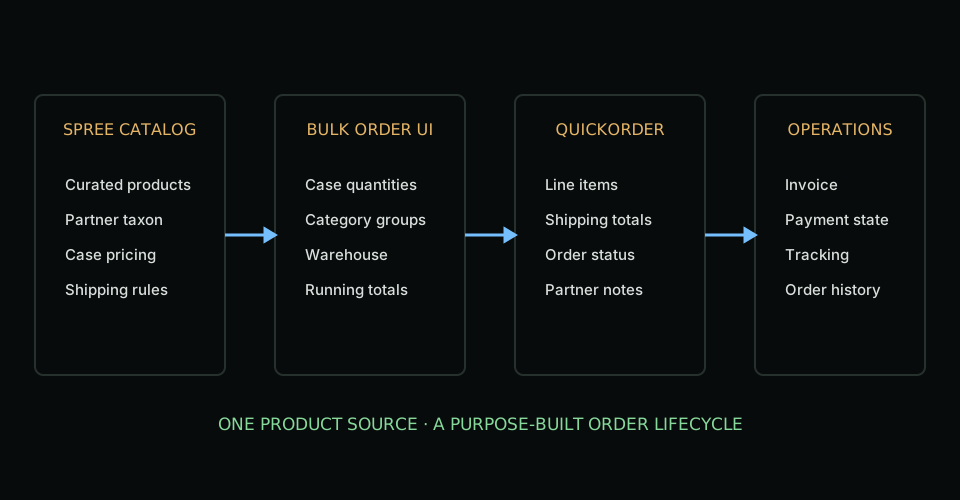
I kept Spree as the source of product truth while introducing a parallel order type for the wholesale workflow.
Each QuickShipper had access to configured warehouses and a curated set of Spree products. Special partnership items were organized through a dedicated taxon, allowing Dogly to reuse product data while controlling exactly what appeared in the bulk-order interface.
The submitted record was a QuickOrder, not a normal consumer order. Its line items referenced the underlying Spree products but stored bulk-specific values such as case quantity, item quantity, category, shipping cost, and total cost.
This boundary avoided pretending a bulk replenishment order had the same lifecycle as a consumer checkout.
Ordering Experience
The ordering screen grouped eligible products by category and let an authorized operator enter case quantities. It displayed the selected warehouse, recalculated totals as quantities changed, and created the order and line items through separate endpoints.
After submission, both Dogly administrators and authorized QuickShipper users could review past orders. The order page became the shared operational record for:
- Products and quantities.
- Warehouse destination.
- Carrier and tracking numbers.
- Internal and partner-visible notes.
- QuickBooks invoice link, due date, and payment state.
- Canceled, due, past-due, and paid status.
Shipping Rules
Shipping was not a single order-level value. Different product categories could have their own free-shipping threshold and normal shipping cost.
The order grouped line items by category, summed the category's merchandise cost, and compared it with the relevant shipping minimum. If the order did not meet the threshold, the category's shipping charge was distributed across its line items. If it did, those line items received no shipping charge.
That calculation ran after the order and line items committed, when the complete category composition was available.
Tradeoffs
The fastest path reused the existing product taxonomy and shipping logic. That reduced duplicate configuration, but it also tied the QuickShipper workflow to conventions that had originally been designed for retail checkout.
The JavaScript submission flow created the order and then its line items through multiple requests. That made the UI straightforward to ship, but a single transactional submission endpoint would have provided a stronger all-or-nothing boundary.
The integration was also intentionally partner-specific. I kept the domain model partner-neutral rather than naming it after Fridge No More, but I did not build a generalized wholesale platform before Dogly had evidence that more partners needed one.
Outcome
The first retained production order totaled $11,935.90 and represented 210 cases of products from Dogly's brands. It validated a new revenue channel without duplicating Dogly's catalog or forcing a wholesale workflow into consumer checkout.
The partnership continued for several months before Fridge No More ceased operations. That limited the lifetime of the channel, but not the value of the engineering result: Dogly went from a partnership request to a working, revenue-producing operational system on a short schedule.
What I'd Improve Today
I would submit the order and all line items through one command object and database transaction, then calculate category shipping from the committed order through an explicit pricing service.
I would also represent price, pack size, and shipping rules as versioned partnership terms instead of reading some behavior indirectly from retail products and shipping categories. That would make historical orders easier to explain if catalog configuration changed.
Finally, I would add a lightweight integration status model for invoice and fulfillment events. The existing fields and notes worked for one partner, but a second partner would justify a more explicit event history.